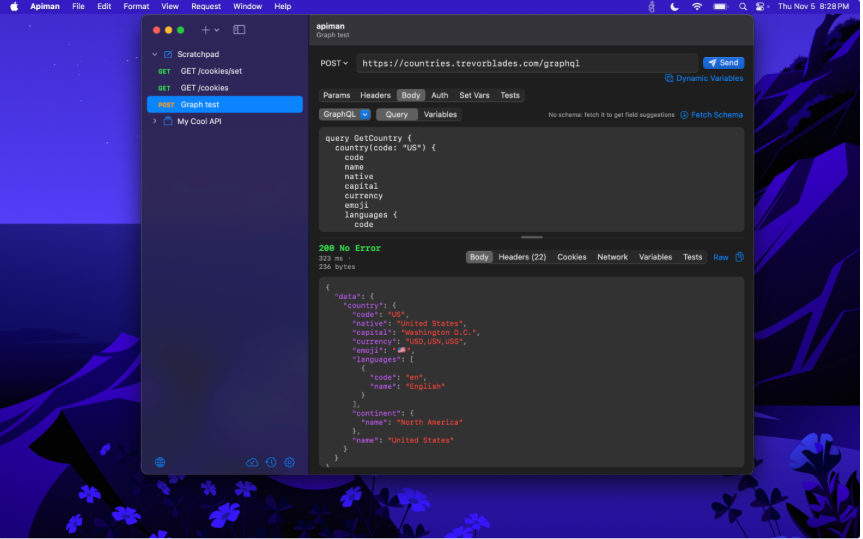
Postman was great a decade ago but it has increased in size and scope over the years. I used to keep it open all the time but increasingly use it less and less mostly due to its size. Over the years I have hoped that someone else would make something native. There have been no good options. I recently decided I didn’t need a 500 MB application to make API requests and made API Man for iOS and Mac. Beyond making API calls, I thought about what I needed and added the test runners, history and assertions. Your data synchs over iCloud if you decide to turn that on. On the Mac app I have added an MCP server so you can use your AI agent to maintain your integration tests and environments and have it synch automatically with the client on iOS. It lacks Grpc but beyond that it should be close ot parity with Postman at about 5MB of pure Obj-C code.
It is currently in public beta on TestFlight . Below is a summary of features I had my intern, Claude write up for the app store submission.
SEND ANY REQUEST
- REST with all HTTP methods, a query-parameter table and headers. JSON, text, form, multipart and file bodies
- GraphQL, with a separate variables editor, field suggestions from the server’s schema and a schema browser
- WebSocket connections with a live, timestamped message log
- Server-sent events that appear live as they arrive
- Auth: Basic, Bearer, API key, Digest, JWT (a freshly signed token for each request), OAuth 2.0 (authorization code with PKCE, client credentials, password) and AWS Signature V4
WORK WITH AI TOOLS (MCP)
- Connect to any MCP server over HTTP, browse its tools and prompts, run tools and read prompts
- On Mac, turn on a built-in MCP server so AI agents can create and edit your requests and read your run history
- The Mac server stays on your computer and requires a token. Agents never see your secret values and can’t send requests or change auth
ORGANIZE AND REUSE
- Collections and folders you can drag to reorder
- Environment, collection and global variables, plus dynamic values like {{$guid}} and {{$timestamp}}
- Secret values stored in the Keychain
- Optional iCloud sync across your devices
CHAIN AND TEST
- Pull values from a response into variables for the next request: JSONPath, headers, cookies, regex, status or response time
- Assertions on every response
- A Collection Runner with iterations, delays, stop-on-failure and live pass/fail with latency stats
- Run History kept on your device
INSPECT
- Pretty-printed JSON, with highlighted XML and HTML, plus headers and cookies
- Image previews right in the response
- Filter JSON responses with JSONPath or jq
- Connection details for each response: TLS, HTTP version and timings
- Searchable history of every request you send
IMPORT AND EXPORT
- Import Postman collections (test scripts become assertions), OpenAPI 3 and Swagger (with syncing), Bruno, OpenCollection, HAR files and cURL
- Export to Bruno, OpenCollection or cURL
- Generate code for wget, HTTPie, JavaScript, Python and Swift
FOR REAL NETWORKS
- Proxy support: system, HTTP or SOCKS5, with authentication and bypass hosts
- Client certificates (mTLS)
- Per-environment cookie jars